![SkyTrak_Logo-1000.png]](https://resources.skytrakgolf.com/hs-fs/hubfs/SkyTrak_Logo-1000.png?height=22&name=SkyTrak_Logo-1000.png)
PC:
1. Clear the Application Cache
2. Lower Graphics Setting
Practice:
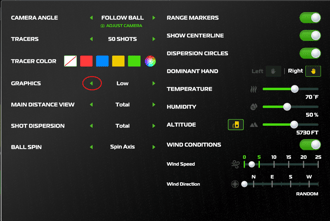
-Click the three lines menu on the top left of the "SkyTrak Range"
-Click "Settings"
-Adjust the graphics drop-down to "Low". You can raise this if you find performance improves after an initial test on Low.
NOTE: Graphics are set to auto-detect by default. Toggling to this setting will return your graphics setting to its original value which is not guaranteed to be correct for your display system.

Course Play:
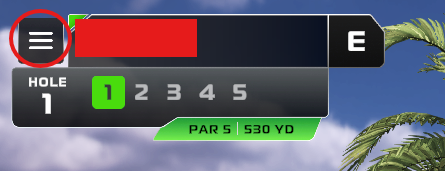
-Click the three lines menu on the top left of the "SkyTrak Range"
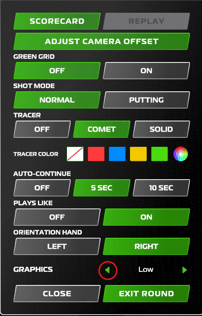
-Adjust the graphics drop-down to "Low". You can raise this if you find performance improves after an initial test on Low
NOTE: Graphics are set to auto-detect by default. Toggling to this setting will return your graphics setting to its original value which is not guaranteed to be correct for your display system.
3. Limit the frame rate of the SkyTrak application
4. Change Connection Mode
-A slow network connection or a problematic USB connection can cause an extra long wait between when you take a shot and when it shows on the screen. Switching to Direct Mode can help to narrow down whether the issue has to do with connection or application performance.
5. Ensure that your PC meets the specification requirements for the installed app version.
iOS:
2. Reinstall the SkyTrak Application
4. Disconnect external displays from iPad.
-If performance improves after disconnecting them, consider changing how you connect. For example, if you are currently using an HDMI adapter, try a wireless option instead. Note that this usually requires connecting a compatible wireless device to the projector, as most projectors do not natively support screen casting.
5. Change Connection Mode
-A slow network connection can cause an extra long wait between when you take a shot and when it shows on the screen. Switching to Direct Mode can help to narrow down whether the issue has to do with connection or application performance.